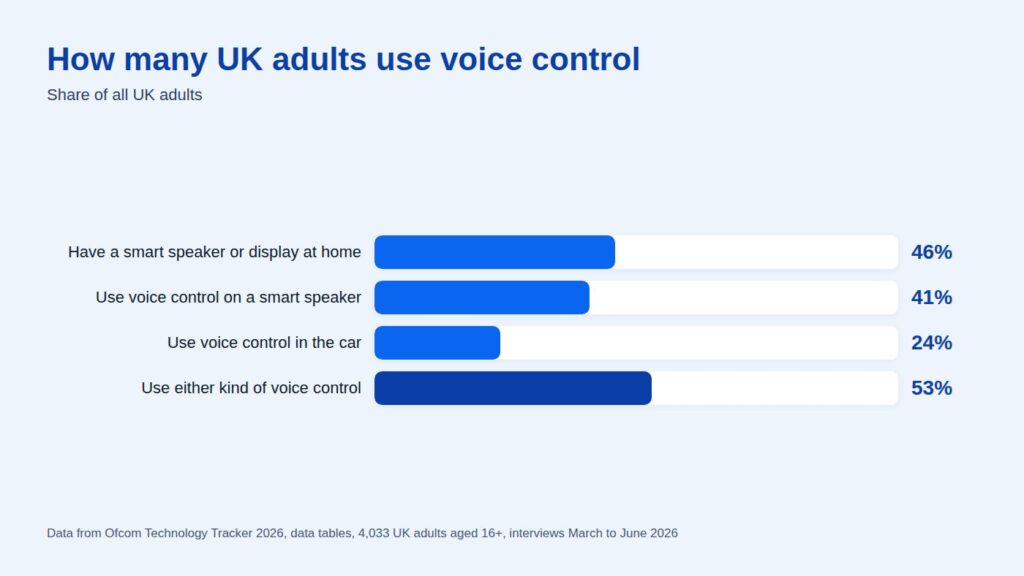
Voice search SEO means making your website the answer that a voice assistant or AI search reads out when someone asks a question out loud. It matters because voice is now ordinary in the UK. In Ofcom’s Technology Tracker 2026, 46% of UK adults said they have a smart speaker or smart display at home, and 53% use voice control on a smart speaker or in the car. The assistants behind those voices now run on AI, so voice search optimisation is mostly the same work as getting found in AI answers. That means clear answers to real questions, well-structured pages, an accurate local listing and a fast mobile site.
This guide covers what’s changed, the current voice search statistics for the UK and the steps that make a business easier to find by voice.
What is voice search SEO?
Voice search is any search made by speaking rather than typing, on a mobile, a smart speaker, a car or a TV remote. Speech recognition turns the words into a query, and the assistant looks for the best answer. Voice search SEO is the part of your SEO strategy that helps those spoken queries land on your business. Spoken questions tend to be more conversational than text-based searches. Someone might type “event venue Manchester” but ask “what’s a good event venue in Manchester for 200 people?”
The other big difference is the answer. A typed search shows a page of results. A voice assistant usually gives one spoken answer, sometimes with a link on screen. So voice SEO is less about ranking somewhere on page one and more about being the clearest, most trusted answer to a specific question.
Voice search statistics for the UK
A lot of the voice search statistics still quoted online date from 2018 and 2019, including predictions that half of all searches would be voice by 2020. That didn’t happen, and those figures are best ignored. These are current figures from primary sources.
- 46% of UK adults have a smart speaker or smart display at home, and 42% have one and use it personally (Ofcom Technology Tracker 2026, 4,033 adults interviewed between March and June 2026, published August 2026).
- 41% of UK adults use voice control on a smart speaker, 24% use it in the car and 53% use at least one of the two (Ofcom Technology Tracker 2026).
- Among people who use a smart speaker, 24% use it to search for information or ask general questions and 29% to check the weather or travel. Music is the most common use at 72% (Ofcom Technology Tracker 2026).
- Amazon says there are over 600 million Alexa devices in use, and its AI-based Alexa+ is in early access in the UK.
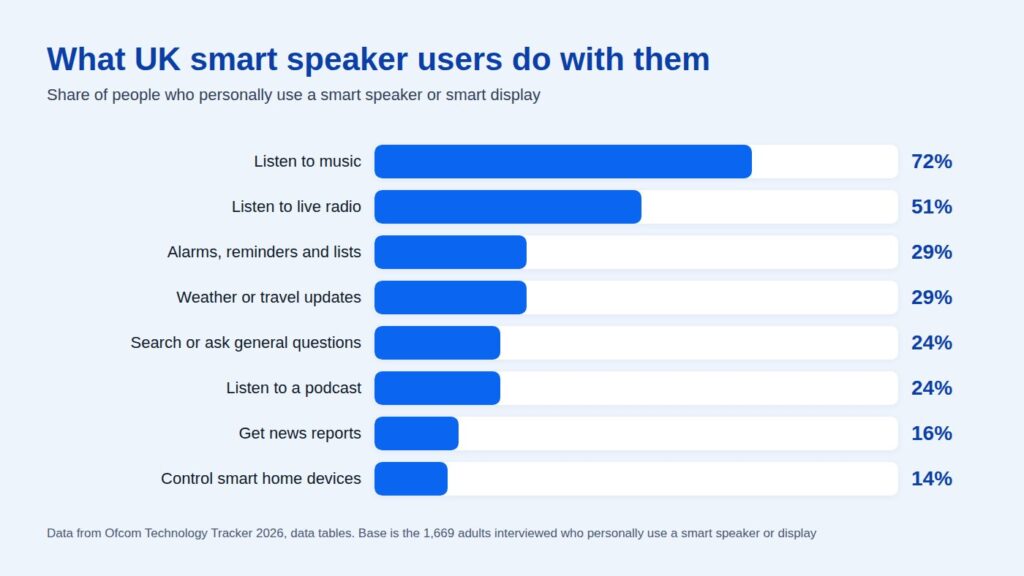
Both charts on this page use figures from Ofcom’s Technology Tracker 2026 data tables. The takeaway for a business is simple. Most spoken use is music, timers and the weather, but roughly a quarter of smart speaker users ask it questions, and phones and cars add more on top. That’s a real audience, just not the takeover that was predicted.
How voice search has changed now assistants use AI
The voice assistants of 2019 mostly read out a featured snippet or a fact from Google’s own data. That’s changing fast.
- Google has been upgrading Google Assistant to Gemini on mobile since March 2025.
- Google launched AI Mode in the UK in July 2025, where you can tap the microphone and ask a question out loud.
- In March 2026, Search Live expanded to every language and location where AI Mode is available, so people can have a spoken, back-and-forth conversation with Google Search.
- Amazon’s Alexa+ is built on large language models, and Apple has relaunched Siri as Siri AI, built on Apple Intelligence. Both now answer questions in conversation rather than reading back a single result.
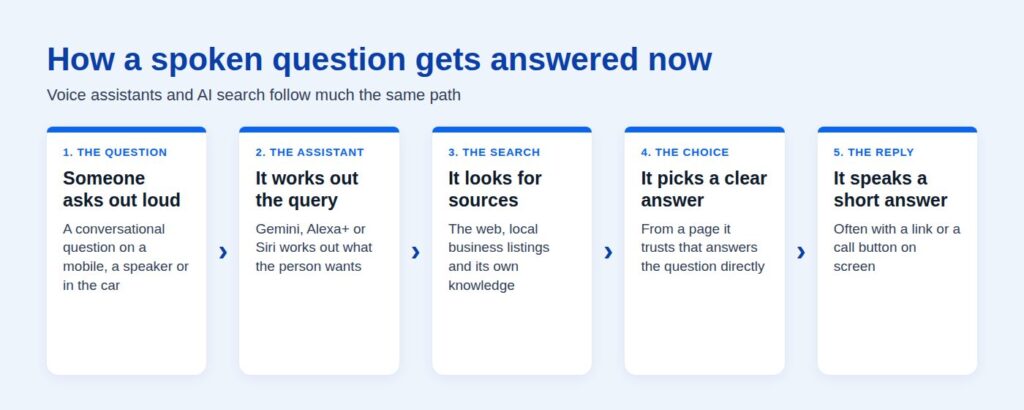
For your website, this means voice search and AI search have merged. When someone asks an assistant a question, it searches the web, weighs up sources and builds a spoken answer from the pages it trusts. Google says there are no additional requirements to appear in AI Overviews or AI Mode beyond normal SEO best practice. In other words, the basics have to be done properly. Our page on AI search optimisation explains how assistants and AI answers pick their sources and what makes a page more likely to be cited.
How to optimise for voice search, a practical strategy
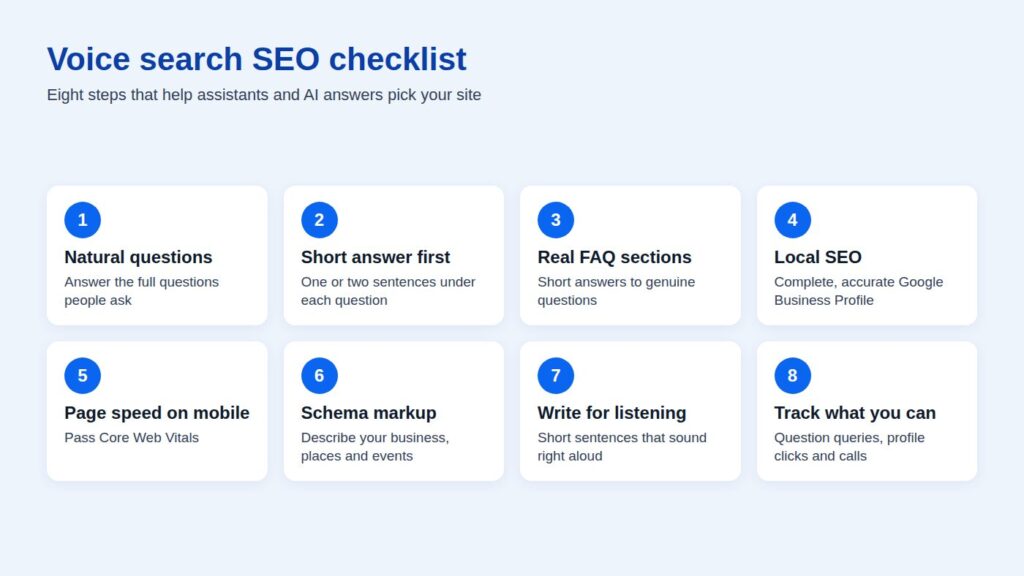
None of these steps are tricks. They make your site better for everyone, which is why they work for voice.
1. Target conversational, long-tail keywords
Start with the questions your customers ask your team, because that’s how people talk when they’re searching by voice. Then check Google’s “People also ask” box and your Search Console queries for longer, question-style searches. Write pages and sections that answer them in natural language, using the same phrases people use. A long-tail keyword like “how much does a wedding venue cost in Leeds” matters more for voice than a short keyword like “wedding venue”. Keyword research tools show the question versions of a topic too, and our guide to keyword research explains how to find them.
2. Put the short answer first for featured snippets
Assistants read out short answers. Under each question, give a direct answer in the first one or two sentences (around 30 to 50 words is a good guide), then add the detail. This is also what gets pages picked for featured snippets and quoted in AI answers.
3. Add FAQ sections built from real questions
A FAQ section is a tidy way to answer several voice queries on one page. Use real questions and keep each answer short. One thing to know is that Google limited FAQ rich results to well-known government and health sites in 2023, so FAQ markup won’t add dropdowns to most search results. The content itself still helps people and assistants find answers.
4. Get your local SEO right
A lot of spoken searches are local, like “near me”, opening hours and directions. Google says local results are based mainly on relevance, distance and popularity, so keep your Google Business Profile complete and accurate. That covers your categories, hours, phone number, address, photos and reviews. Make sure the same name, address and phone number appear on your website. There’s more on this in our Google Business Profile statistics.
5. Improve page speed on mobile
Most voice searches happen on a mobile device, and a slow page loses the visit even if the assistant sends it. Google’s Core Web Vitals targets are LCP within 2.5 seconds, INP of 200 milliseconds or less and CLS of 0.1 or less, measured at the 75th percentile of visits. Our guide to page experience and Core Web Vitals explains what each one means.
6. Use schema markup that describes your business
Schema markup tells search engines exactly what a page is about, such as your organisation, location, opening hours, products or events. It helps search engines and AI systems match your page, product or service to a specific question. Google’s speakable markup is still in beta and only works for news publishers in the US, so most businesses can skip it. A technical SEO review will check that your schema is valid and that nothing is stopping your pages being crawled.
7. Write for listening, not just reading
Read your key answers aloud. Short sentences, plain words and no jargon work best when an assistant is reading them to someone in a kitchen or a car. If an answer only makes sense alongside a table or an image, add a sentence that says the main point in words.
8. Track what you can
Search Console doesn’t tell you which searches were spoken, so understanding your voice traffic takes a bit of reading between the lines. Watch the queries that start with how, what, where and best, the clicks from your Google Business Profile and calls from local search. If those grow, your SEO for voice is paying off.
Is voice search SEO different from traditional SEO?
Less than it used to be. The same pages rank for typed and spoken searches. What changes is the shape of the query and the answer.
| Typed search | Voice search |
|---|---|
| Short keywords, like “event venue Manchester” | Full questions, like “what’s a good event venue in Manchester?” |
| A page of results to choose from | Usually one spoken answer, sometimes with a link |
| Often on a laptop at work | Mostly on a mobile, a smart speaker or in the car |
| Rewards a strong page overall | Rewards a clear, short answer near the top of the page |
Common questions about voice search optimisation
What is voice search optimisation in digital marketing?
It’s the work of making your content the answer when someone asks a voice assistant a question. In practice it means answering real questions clearly, keeping your local listings accurate and making sure your site is fast on a phone.
How do I optimise for AI search?
Much the same way. Answer questions directly, back claims with sources, structure pages with clear headings and keep your site technically sound so it can be crawled. Our AI search optimisation page covers the detail.
How do you enable voice search?
On a mobile, tap the microphone in the Google app or the search bar, or use the assistant built into the device. On a smart speaker, say its wake word and ask your question.
Does schema markup help voice search?
It helps search engines understand your business details, which supports local and factual answers. It won’t make a weak page the answer on its own, so treat it as a finishing step after the content is right.
Get your site ready for voice and AI answers
If you’re not sure whether your site is ready, our free website audit checks your speed, SEO, schema and tracking and shows you what to fix first. You’ll get the report within one working day.