If you’re comparing Webflow vs WordPress for marketing teams without a developer, I’d pick WordPress for most teams. Every person who edits the site is free, there are about 80,000 free plugins to connect it to the tools you already use, and the site is yours to move to any host. Webflow is a good choice when you have a designer who wants close control of the layout, the site is mostly landing pages, and you’re happy to pay per editor and stay on the platform.
Webflow vs WordPress for Marketing Teams at a Glance
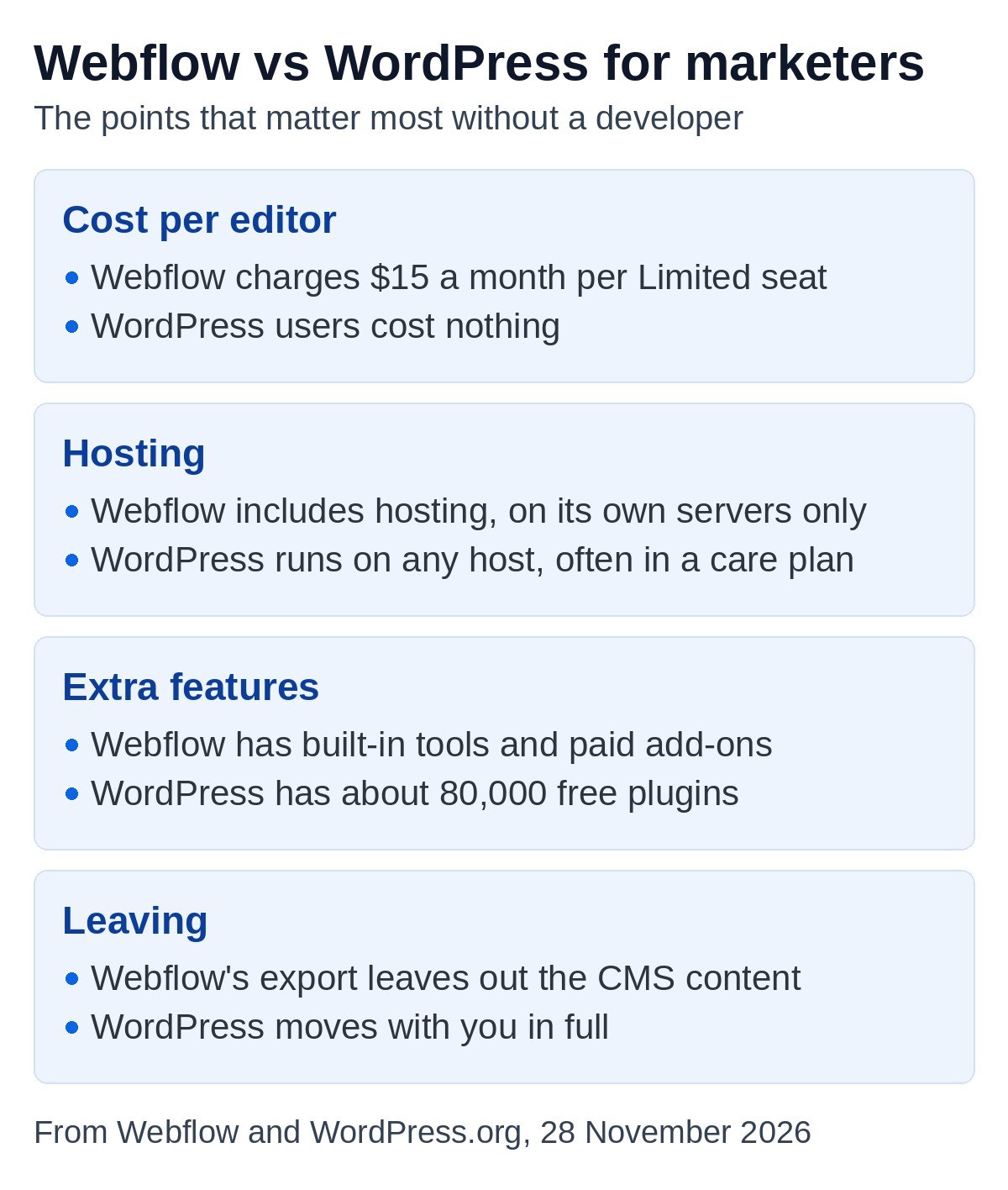
Webflow and WordPress both publish a website your staff can edit without code. Where they differ for a marketing department is cost per person, how far each one stretches, and what happens if you ever want to leave.
| Point | Webflow | WordPress |
|---|---|---|
| Who edits | Each marketer or content editor needs a Limited seat at $15 a month, billed yearly | Unlimited users at no cost, with roles such as Editor, Author and Contributor |
| Hosting | Included in the site plan, on Webflow only | Any host you choose, often bundled into a care plan |
| Extra features | Built-in tools plus its own apps and add-ons | About 80,000 free plugins in the official directory, plus custom code |
| Leaving | Code export leaves out CMS content, forms and search | Full export of content and users, and the whole site moves to another host |
| Upkeep | Webflow handles the platform | Updates and security need someone, which a care plan covers |
| Best for | A design-led site of landing pages and a simple blog | A business where several people publish and the site has to work with other tools |
Webflow Pricing and What It Costs a Team
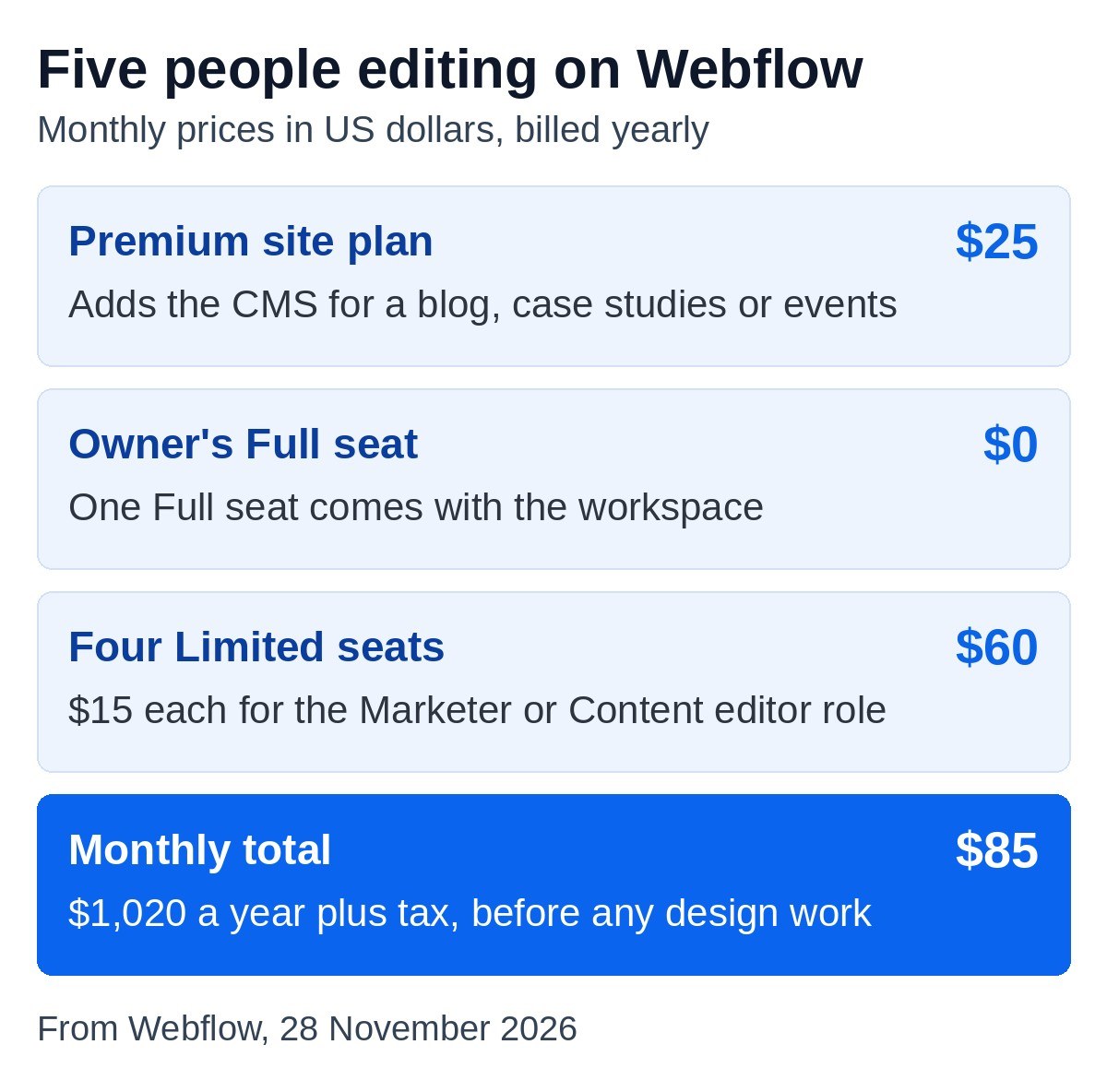
Webflow’s pricing page lists a CMS site at $25 a month billed yearly, then charges for each person who works on it. For five people that comes to about $85 a month before anyone has built a page.
When I checked Webflow’s plans and pricing on 28 November 2026, the Basic site plan was $15 a month billed yearly, for simple sites that don’t need a CMS and up to 300 static pages. The Premium plan, which adds the CMS for a blog, case studies or event listings, was $25 a month billed yearly. Prices are in US dollars, per site, with tax added at checkout. Above that sits a Team platform plan at $2,500 a month on an annual contract, which brings publishing workflows and more control over who can do what.
Then there are seats. According to Webflow’s help centre, a Limited seat covers the Marketer and Content editor roles and a Full seat covers admins and designers. The workspace owner always needs one full seat. On the pricing page a Limited seat was $15 a month per seat and a Full seat $39, both billed yearly, with free seats only for reviewers who comment.
So the owner on the included full seat, each Webflow editor on a Limited seat (four of them here) and a Premium site plan come to $85 a month or $1,020 a year, before any design or development project.
WordPress itself is free software. Users cost nothing however many you add, so you pay for hosting and someone to look after updates and fixes. Our website maintenance plans start with Care at £150 a month plus VAT and include hosting for most sites, so there’s no separate bill for it.
Design and Ease of Use Without a Developer
Webflow is easier for a designer and WordPress is usually easier for everyone else.
The Webflow Designer works a lot like writing CSS with a mouse. Boxes, classes, breakpoints and interactions are all visual, and someone who knows how web design and layout work can build almost anything. Webflow templates give a design head start too. Marketers who just want to change a headline or add a case study use a simpler content editing mode, and that part is pleasant to use. The catch is that new page layouts and sections often go back to whoever can use the Designer.
WordPress splits the work differently. A developer or agency builds reusable sections once, in the block editor, a custom WordPress theme or a page builder such as Bricks or Elementor, and your people assemble new landing pages from them. User roles decide who can do what. The WordPress roles run from Administrator down to Editor, Author and Contributor, so a junior writer can draft without publishing. It does depend on the build. A messy site with three page builders is hard to use, and that’s a build problem more than a platform one.
Plugins, Integration and Features
WordPress connects to far more marketing tools. The official WordPress plugin directory lists about 80,000 free plugins, covering forms, CRM connections, events, booking, ecommerce, translation and SEO, and WordPress themes add layouts on top.
Webflow offers more built into the platform itself. Webflow includes forms, a CMS and hosting, with optional add-ons for analytics, testing and translation, each with its own monthly price. It also has an API for adding and updating CMS items. That’s tidy when the built-in feature does what you need. When it doesn’t, the answer is usually a third-party embed or custom code, which is the work you were trying to avoid.
WordPress plugins are also its main weakness. Every one needs updating, and a badly written or abandoned plugin can slow the site or open a security hole. Fewer, better plugins and a schedule of tested updates fix most of that.
SEO, Performance, Security and Support
Both platforms can rank well. What decides it is clean pages, fast loading, good content and links, and both give you control of those.
Webflow gives you control of titles, descriptions and page structure, and its hosting runs on Cloudflare’s content delivery network. WordPress gets the same through an SEO plugin and decent WordPress hosting, and structured data and AI search work are easy to extend. Our WordPress development work keeps sites lean so speed doesn’t rest on anyone’s defaults.
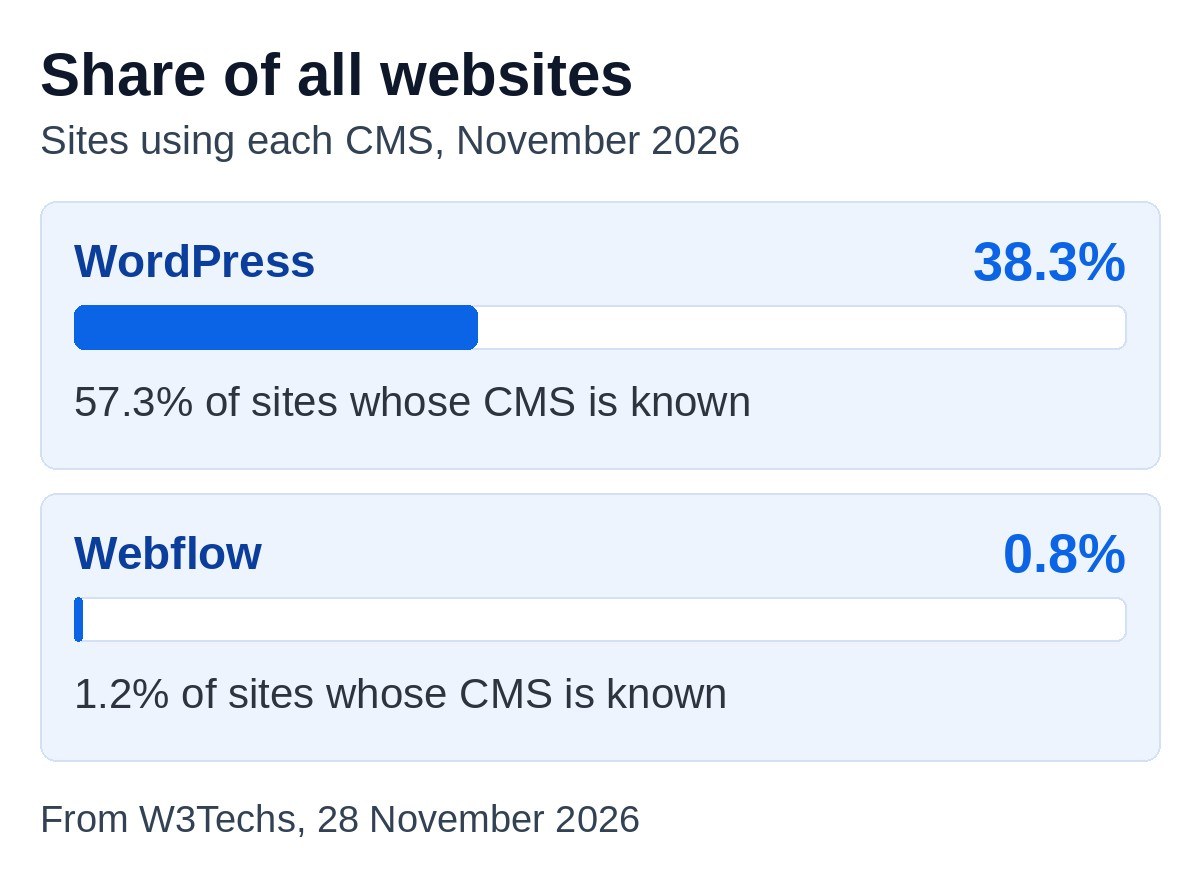
On security, Webflow is a hosted platform, so there’s no core or plugin to patch. WordPress is a bigger target because it runs so much of the web. W3Techs puts WordPress on 38.3% of all websites and Webflow on 0.8%. A site that’s updated weekly, backed up daily and monitored is a safe site. One that nobody looks after isn’t, and that’s the real choice when you have no developer.
Support works differently too. Webflow’s pricing page says its email support aims to reply within 48 hours. On our Support and Team plans you get a same-day reply 7 days a week, from people who already know your site.
What Happens If You Leave the Platform
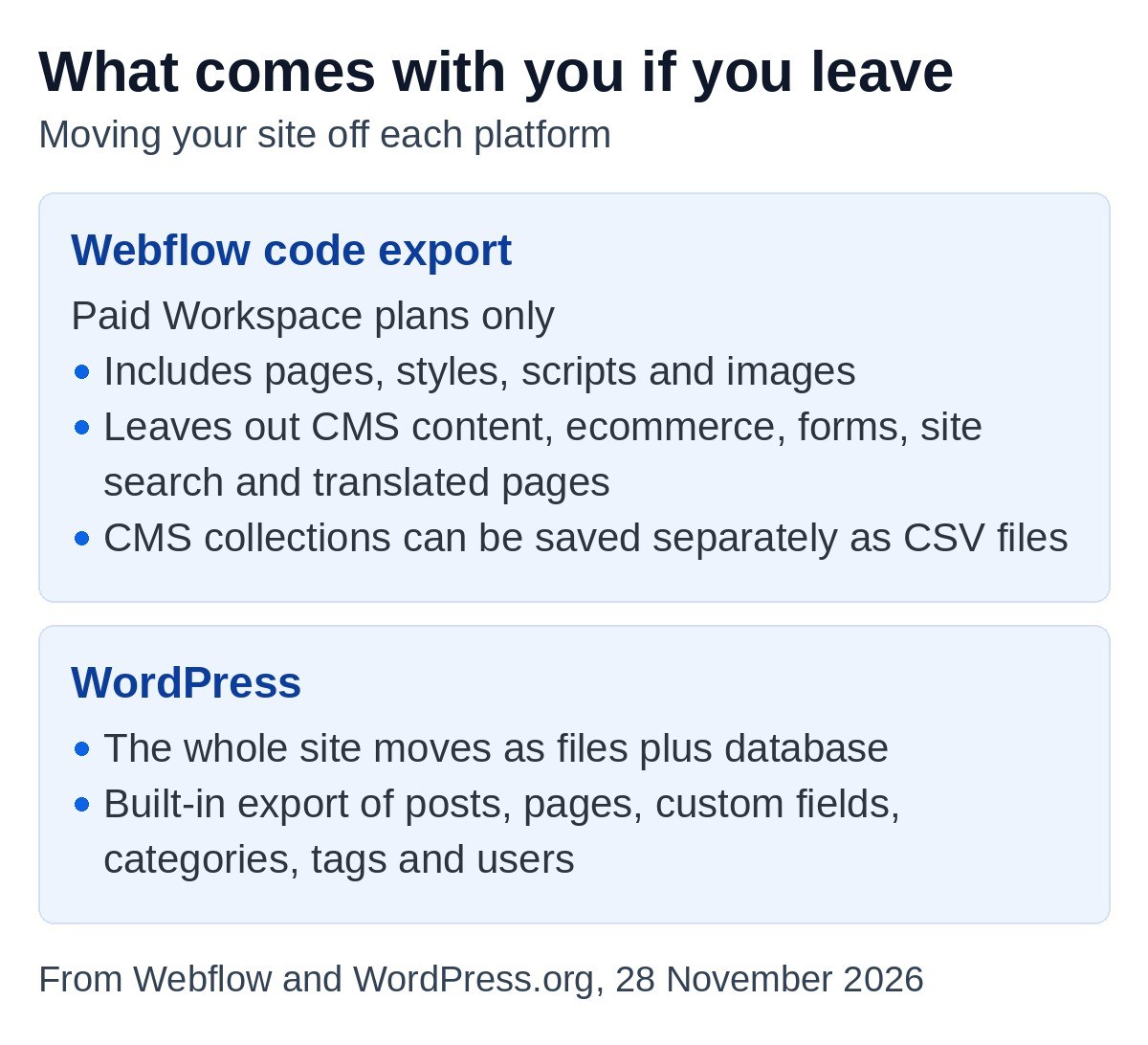
This is where the two differ most. A WordPress site can be picked up and moved to another host or agency complete. A Webflow site can’t really leave with its CMS and forms working.
Webflow’s code export is only on paid Workspace plans, and it leaves out CMS content, ecommerce, user accounts, form processing, site search and translated pages. CMS collections come out separately as CSV files. The pricing page FAQ also says exported code can’t be imported back in, because sites can only be built inside Webflow.
WordPress has an export built in. According to the export documentation, Tools then Export creates a file with your posts, pages, custom post types, comments, custom fields, categories, tags and users, ready to import elsewhere. In practice the site moves as a full copy of its files and database, so everything comes with it.
Should a Marketing Team Choose Webflow or WordPress?
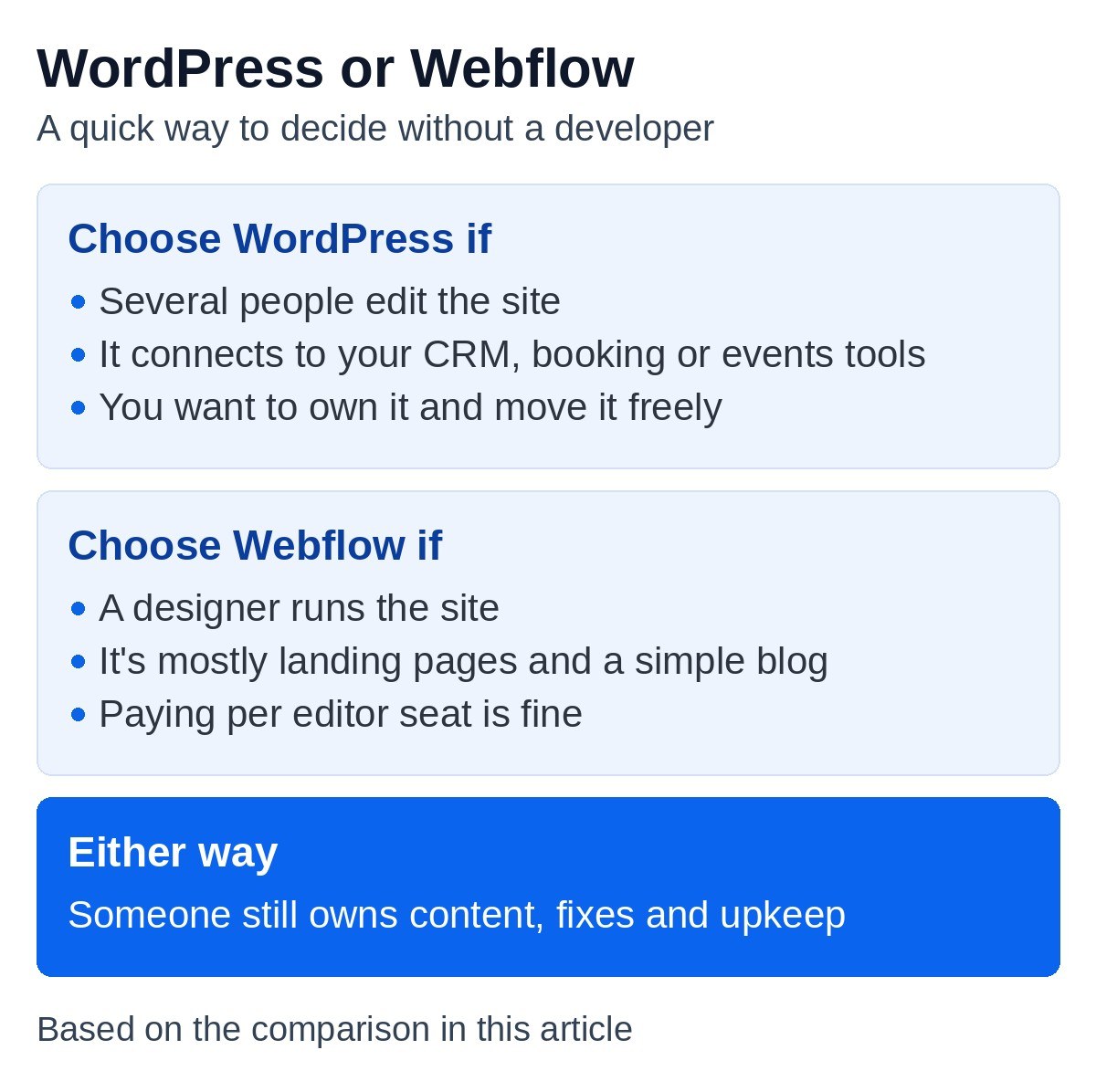
Choose WordPress if several people edit the site, you need it to connect to your CRM, booking or events tools, or you want to own it outright. Use Webflow if a designer runs the site, it’s mostly campaign pages, and a few paid seats are fine.
A few rules make the choice quicker.
- If you have no one to apply updates, pick a managed site on either platform. Don’t run an unmanaged WordPress site.
- If more than two or three people will edit, compare Webflow’s seat costs with a care plan before you decide.
- If the site needs bookings, a members area or a shop with unusual rules, go with WordPress.
- If your brand changes agency every couple of years, pick the platform you can take with you.
Moving From Webflow to WordPress
If you’re on Webflow now and it’s starting to cost more in seats or workarounds than it saves, a move is straightforward. Collections export as CSV, pages get rebuilt as editable sections, and every old address gets a redirect so you keep your rankings.
Our website migration service moves sites from other website builders to WordPress and checks every page, form and link before the switch. If you’d like to know what your current site needs first, our free website audit looks at speed, SEO, forms and tracking and sends you a plain report within one working day. There’s more on how we work with marketing departments on our marketing teams page.
How We Compared
This WordPress vs Webflow comparison is a desk comparison for a UK marketing team with no developer, checked on 28 November 2026. Webflow prices, seats, support and export rules come from its pricing page and help centre. WordPress facts come from the WordPress.org documentation and plugin directory, and usage figures from W3Techs. Our own prices are our published plan prices.
Frequently Asked Questions
Is Webflow easier than WordPress?
For a designer, often yes, because the Webflow Designer gives close control of layout without code. For marketers editing content, both are easy once the site is built well. WordPress gets easier the more reusable sections a developer sets up for your staff to build pages from.
Is Webflow cheaper than WordPress?
Not for most teams. The CMS plan was $25 a month billed yearly when checked, plus $15 a month for each extra content editor. WordPress users are free, so the cost is hosting and upkeep. Our Care plan is £150 a month plus VAT with hosting included for most sites.
Can I move a website from Webflow to WordPress?
You can. Webflow lets you export CMS collections as CSV files and download the page code on paid Workspace plans. The pages are then rebuilt in WordPress, the content imported, and redirects set up from every old address so search rankings carry across.
Does WordPress work with Webflow?
Not directly. They’re two separate platforms, each with its own editor and hosting. You can run a Webflow site next to a WordPress blog on a subdomain, but that’s two systems to pay for and keep consistent.
Is WordPress still worth it?
For most marketing teams it is. W3Techs shows WordPress on 57.3% of websites whose content management system it can identify. It’s free, it’s widely supported, and your site stays yours. It does need regular updates and backups, so make sure someone is doing them.