Responsive web design is a way of building one website whose layout adapts to whatever screen it’s viewed on. The same HTML is sent to every phone, tablet and desktop, and CSS uses fluid grids, flexible images and media queries to rearrange the page for each screen size. Google recommends responsive web design because it’s the easiest pattern to build and maintain, and it matters more every year. StatCounter’s figures for October 2026 put mobile at 51.95% of web page views in the UK, ahead of desktop at 43.66%.
This guide explains what it is, how it works, why it’s important for your visitors and your search rankings, and how to check your own website.
What is responsive web design?
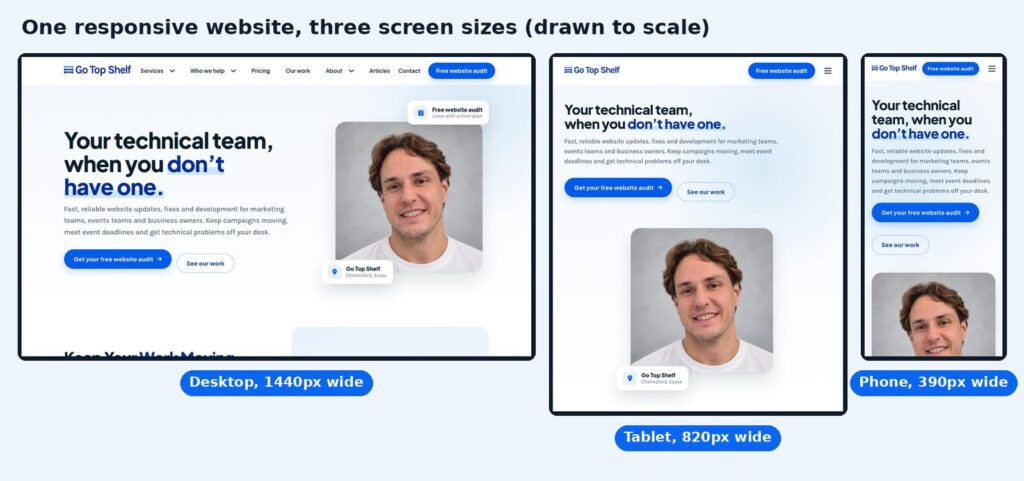
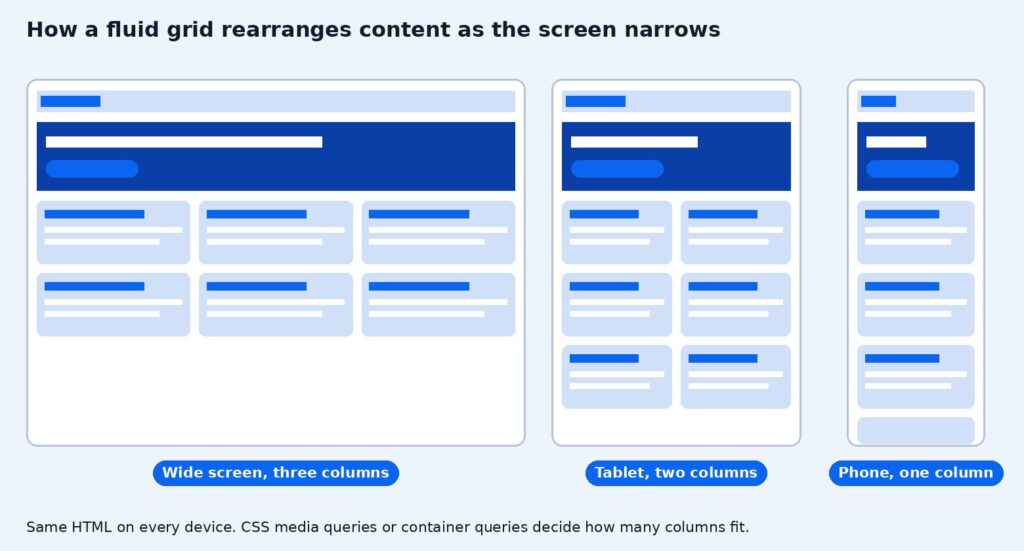
It means one site, one set of URLs and one HTML document for every device, with a layout that responds to the width of the browser window, so web pages render well on any device screen. On a wide screen you might see three columns side by side. On a phone the same content stacks in a single column, the menu collapses behind a button, and images resize to fit.
The term comes from Ethan Marcotte’s article in A List Apart, published on 25 May 2010. He combined three ideas that are still the basis of responsive websites today, fluid grids, flexible images and CSS3 media queries.
Google describes three ways to make a site work on mobile phones. The responsive approach serves the same HTML on the same URL to every device. Dynamic serving uses one URL but sends different HTML depending on the device. Separate URLs means a different mobile site, such as m.example.com. Google recommends the first, and almost every modern website design uses it.
How responsive design works in HTML and CSS
A responsive site is built from a handful of techniques in HTML and CSS. Your developer handles the code, but knowing the names helps you brief changes and spot problems.
Set the viewport with the viewport meta tag
Phones pretend to be wide desktop screens unless the page tells them otherwise. The viewport meta tag in the HTML head sets the viewport width to the device width, so the layout matches the real screen. MDN’s recommended setting is width=device-width. Without it, a phone shows a tiny zoomed-out version of the desktop page.
Fluid grids and a flexible layout
Instead of fixed pixel widths, a responsive layout uses relative units such as percentages, so columns grow and shrink with the browser width. Modern sites build these fluid grids with CSS grid and flexbox, which can wrap items onto new rows when there isn’t room. That’s how a row of three cards on a computer becomes a single column on a phone.
Media queries and media features
Media queries are CSS rules that apply only when the screen meets a condition, such as being at least 768 pixels wide. The condition is called a media feature. Width is the one used most, but media features also cover orientation, whether the device has a mouse or a touchscreen, and whether the user prefers dark mode or reduced motion. Developers use multiple media queries to change the layout, font size and spacing at different screen sizes. The points where the layout changes are called breakpoints. There’s no official list. Good breakpoints are set where your content starts to look cramped, not by a particular phone model.
Flexible images, max-width and responsive images
Flexible images scale down to fit their container, usually with a max-width of 100% in the style sheet so an image never spills off the screen. Responsive images go further. The srcset and sizes attributes, explained in MDN’s guide, let the browser download a smaller file on a phone and a larger one on a big screen. That saves data and makes pages load faster on mobile devices.
Text size and typography
Text needs to stay readable at every width. Using relative units for font size, and adjusting headings at each breakpoint, stops headlines filling a whole phone screen and body text shrinking too small to read.
Container queries
Media queries respond to the width of the whole screen. Container queries respond to the space a component actually has, so a card can change its layout whether it sits in a wide content area or a narrow sidebar. MDN lists container queries as available across browsers since February 2023, and they’re now a normal part of building reusable components.
Why responsive web design is important
A website that doesn’t work on a phone loses people before they read a word. Here’s why it’s the standard, not an extra.
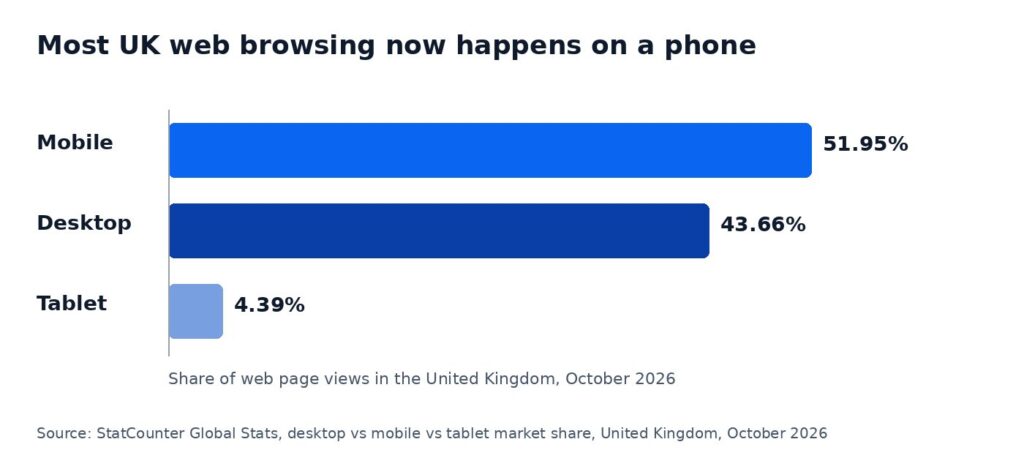
- Most visits now come from phones. In the UK, mobile passed half of all web page views in StatCounter’s October 2026 data. Many of your visitors will judge you on a small screen first.
- Google ranks the mobile version. Google completed its move to mobile-first indexing in October 2023, so the mobile version of your page is the one it crawls and ranks. Google also advises keeping the same content on mobile and desktop.
- One site, one set of links. When someone shares a page from their phone, it opens properly on a laptop, and every backlink points to one URL instead of being split between two sites.
- One site to maintain. A separate mobile site doubles the work of every update. A responsive site means your team changes a page once.
- Accessibility. WCAG 2.2 success criterion 1.4.10 Reflow (level AA) asks for content to work at a width of 320 CSS pixels without scrolling in two directions. That’s the same as zooming a 1280 pixel wide page to 400%, which is how many people with low vision browse.
- Speed and user experience. Google’s Core Web Vitals measure loading, responsiveness and layout stability for real visitors on mobile and desktop. A well-built responsive layout, with properly sized images and no layout jumps, helps you meet them. Our guide to Core Web Vitals and page experience covers the targets.
For marketing and events teams this is practical, not technical. Campaign emails, social posts and event QR codes are opened on phones. If the page they land on is hard to use, the campaign underperforms however good the offer is.
Mobile-first design
Mobile-first design means planning and building the smallest screen first, then adding layout and features as the screen gets bigger. The alternative, desktop-first, starts with the full desktop page and squeezes it down. Both produce a responsive site, but they lead to different results.

Starting with mobile forces the useful questions early. What’s the one thing this page must do? Which content matters most? What can go? Developers call this progressive enhancement, building a solid core that works everywhere, then enhancing it for larger screens and more capable browsers. Desktop-first often ends in graceful degradation, where features are hidden or crammed in as the screen shrinks, and the mobile page feels like an afterthought.
Mobile-first doesn’t mean mobile-only. Desktop still accounts for 43.66% of UK page views in the same StatCounter data, so the desktop layout needs the same care. It just means the phone is never left until last.
Responsive web design best practices
Here’s a short checklist for any responsive website.
- No sideways scrolling. Nothing should be wider than the screen at 320 pixels, including tables, images and embedded videos.
- Easy tapping. Buttons and links should be large enough to tap and spaced apart. WCAG 2.2 sets a minimum of 24 by 24 CSS pixels, and larger is better on a phone.
- Readable text without zooming. Body text at a comfortable size, with line lengths that don’t run edge to edge on wide screens.
- Same content everywhere. Don’t hide important information on mobile. Rearrange it.
- Properly sized images. Serve smaller images to small screens and set width and height so the page doesn’t jump while it loads. See why image size matters.
- No intrusive popups. A popup that covers a phone screen is far more annoying than one on a desktop.
- Forms that work with thumbs. Short forms, the right keyboard for each field, and labels that stay visible.
- Test on real devices. Simulators are useful, but nothing beats trying the page on an actual phone.
How to test responsive websites in your browser
- Open your site on a desktop and slowly make the browser window narrower. The layout should adjust smoothly, with no content cut off and no horizontal scroll bar.
- Use device mode in Chrome. Chrome DevTools device mode lets you preview the page at common phone and tablet sizes.
- Open your most important pages on your own phone, including the home page, a service or product page, and your contact form. Try to complete the main action.
- Run the page through PageSpeed Insights and check the mobile results, including Core Web Vitals.
- Check Search Console’s Core Web Vitals report to see how real visitors experience the site on mobile.
If your site fails any of these, the fix is often specific rather than a full rebuild, such as a table that needs to scroll, a menu that breaks at one width or images that are far too large. Older sites built before responsive layouts became normal usually need a website redesign. Either way, our free website audit tests your site on phones and computers and shows you what to fix first.
Common questions about responsive web design
What is responsive design used for?
Responsive design is used to make one website work well on every device, from small phones to large desktop monitors, without building and maintaining separate mobile and desktop sites.
What is responsive web design in CSS?
In CSS, responsive design means using relative units, flexible layouts such as CSS grid and flexbox, max-width on images, and media queries or container queries to change the layout at different screen sizes. The HTML stays the same.
What are the standard breakpoints for responsive design?
There’s no official standard. Many frameworks use breakpoints around phone, tablet and desktop widths, but the best approach is to add a breakpoint wherever your own content starts to look cramped or stretched.
Is responsive design the same as mobile-first?
No. Responsive design is the result, a layout that adapts to every screen. Mobile-first is a way of getting there, by designing for the smallest screen first and building up.
Does responsive design help SEO?
Yes, indirectly. Google indexes the mobile version of your pages and recommends this approach. A responsive site keeps one URL per page, the same content on every device and a better experience on phones, all of which support your rankings. Our technical SEO service checks these issues across the whole site.
Need your site working properly on every screen? Our web design team builds responsive, mobile-first websites, or start with a free website audit to see how your current site performs on phones.