Is a website maintenance plan worth it? For most teams without a developer, yes, as long as the website brings in enquiries, bookings or sales. A maintenance plan pays a professional to handle the regular maintenance tasks every week, keep tested backups, watch for downtime and fix issues when something breaks, so the work actually gets done instead of slipping down the to-do list.
If you’re asking yourself “do I need a website maintenance plan?”, the honest test is what a broken site would cost you. A form that quietly stops sending, a hacked homepage or a site that falls over the morning tickets go on sale usually costs far more than a year of maintenance. If your site is a simple brochure and someone in-house is happy to do the routine maintenance, you may not need one. This guide walks through what the work involves, how often it needs doing and what happens when it’s skipped, so you can decide for your own site.
Is a Website Maintenance Plan Worth It for Your Business?
A website maintenance plan is worth it when three things are true. Your site brings in business, nobody in-house has the time or skills to look after it, and you work to dates you can’t move. If all three apply, the plan usually pays for itself the first time something goes wrong.
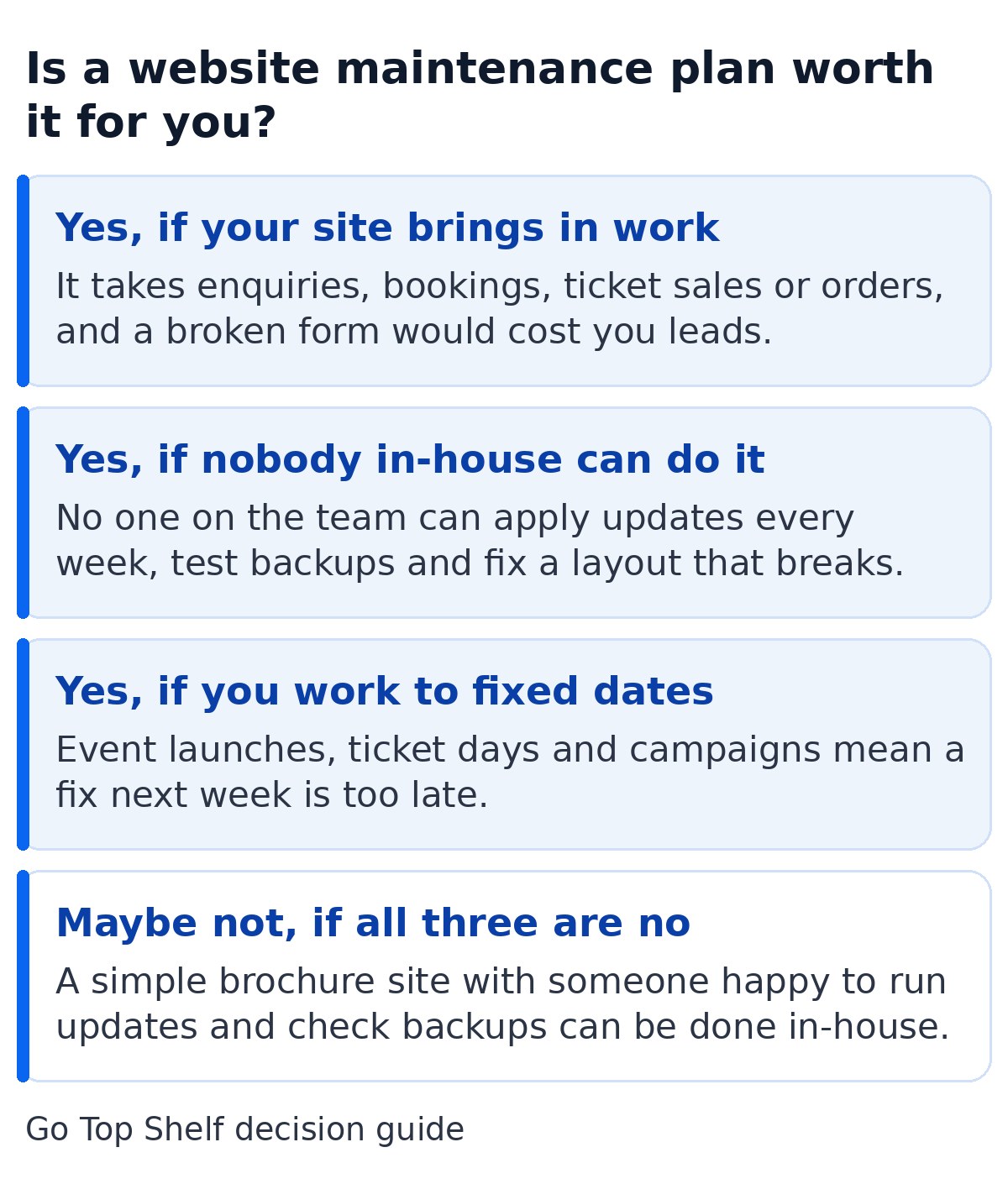
Here’s how I’d think about it for each type of customer we work with.
- Marketing teams. Your site is where campaigns send people. If a landing page breaks or a form stops sending during a campaign, you’re paying for traffic that can’t convert. Regular maintenance keeps the forms, tracking and pages working so the budget isn’t wasted on a broken page.
- Events teams. Booking and ticket pages have to work on the day sales open, often with far more visitors than usual. A plan means the maintenance work is done well before the busy week and someone is on hand the moment there’s an issue.
- Event suppliers. Your customers check your site before they enquire. A slow site, broken links or a security warning lose trust quickly, and the enquiry goes to whichever company’s site works.
The case for a plan is weakest when the site rarely changes, earns nothing directly and someone in-house is genuinely happy to log in every week. In that situation doing it yourself is perfectly reasonable, as long as it actually happens. I’ve put the costs of each route side by side in our guide to how much website maintenance costs in the UK.
What Does Website Maintenance Include for Security and Performance?
Website maintenance includes hosting, backups, updates, security and uptime monitoring, performance checks and small fixes when something stops working. With good website maintenance services most of it happens without you asking, on a fixed schedule, and you only hear about it in a monthly summary or when something needs your input.
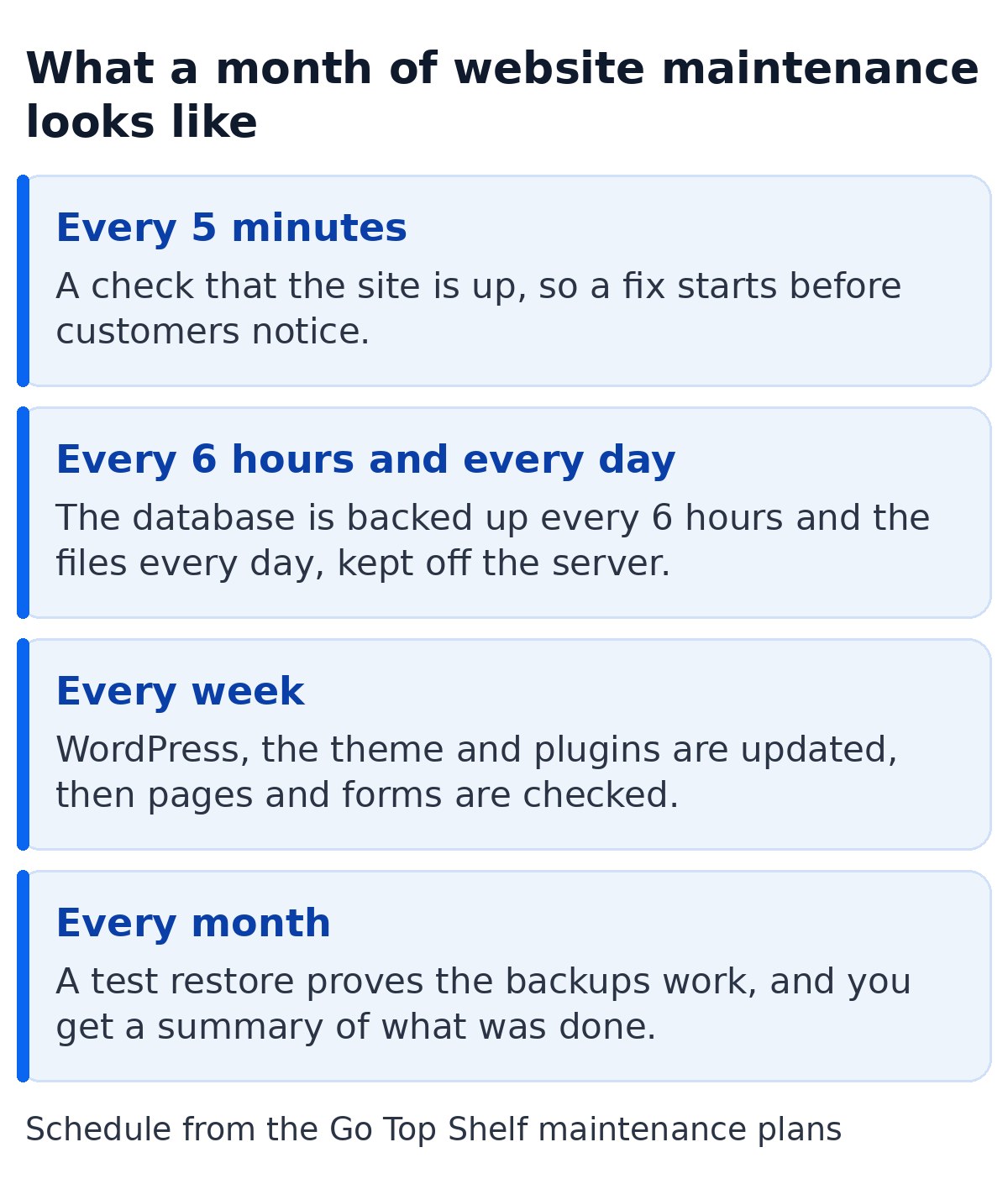
This is the routine maintenance we run on every site we look after, so you can compare any of the maintenance packages you’re offered against it.
- Managed hosting. Server management, the SSL certificate and the settings behind them, so the site stays online and quick.
- Uptime monitoring every 5 minutes. If the site goes down, the alert reaches us and work starts as soon as the problem is spotted.
- Backups every 6 hours and every day. The database is saved every 6 hours and the files every day, stored away from the server and kept for up to a year.
- Weekly updates. WordPress, the theme and every plugin get the latest versions, then the pages, forms and checkout are checked so nothing is left broken.
- Security monitoring. Two-factor sign-in for admins, lockouts after repeated failed logins, spam protection on forms and regular scans for known holes.
- Performance. Keeping pages quick as plugins and content pile up. If yours has slowed down, our tips to improve WordPress site speed cover the usual causes.
- Small fixes. Broken links, a form that stops sending or a layout that slips.
- A monthly test restore. A backup you’ve never restored is a guess. Testing one every month proves the backups work before you need them.
Regular maintenance only protects you if every part of it happens. When you compare WordPress maintenance services, ask whether each of these maintenance tasks is included or charged as an extra job. Look closely at hack repair and testing after updates, because a service can call itself maintenance without either. Some services click the button and move on, which is how a site ends up down on a Friday afternoon with nobody watching.
How Often Should You Update WordPress Plugins?
You should update WordPress plugins at least once a week, and apply security fixes the same day they’re released. That sounds frequent, but attackers now move within hours of a security hole being made public, so a monthly or quarterly maintenance routine leaves a site open for weeks at a time.
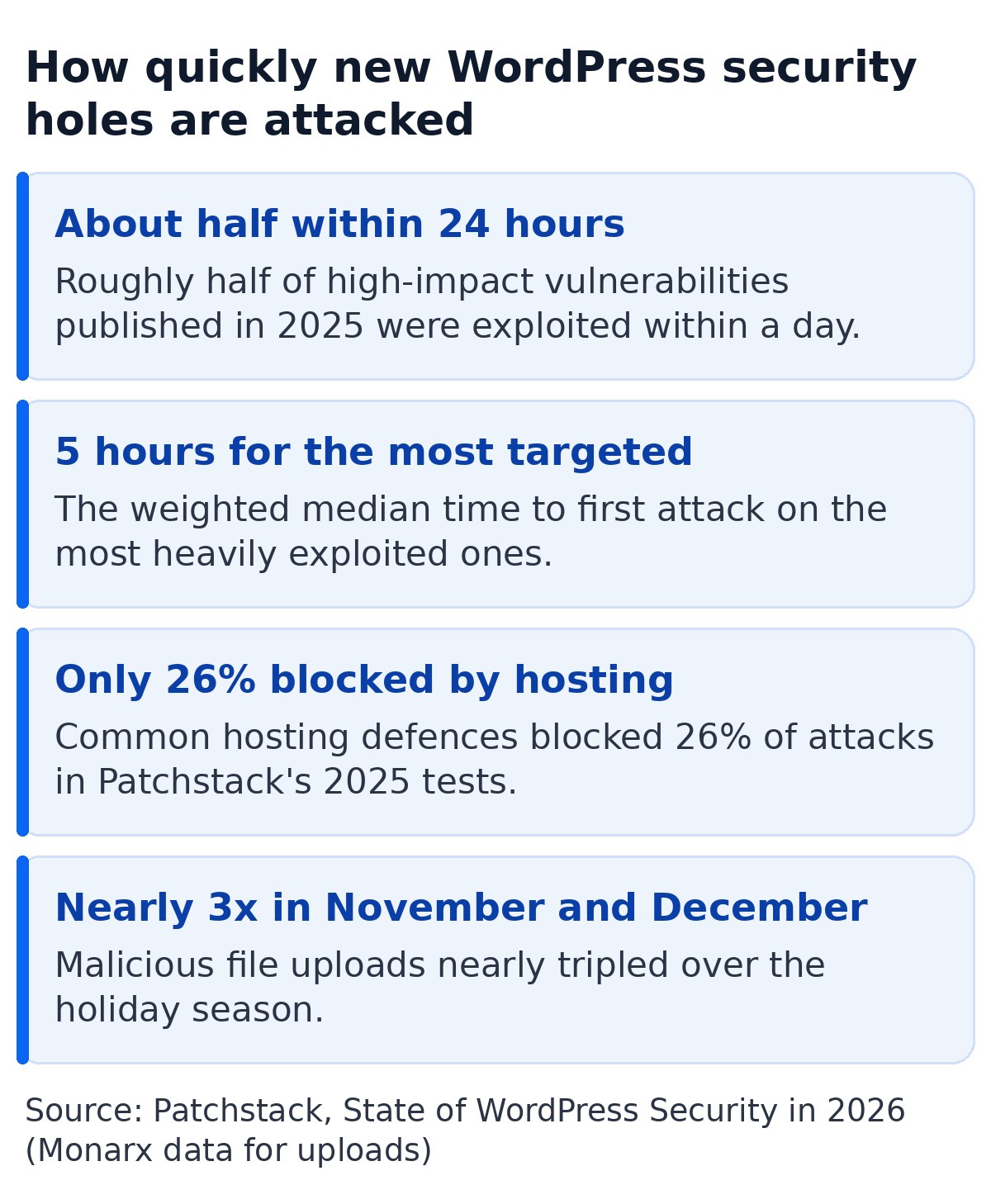
Patchstack’s State of WordPress Security in 2026 report found that about half of high-impact vulnerabilities published in 2025 were exploited within 24 hours. For the most heavily targeted ones, the weighted median time to the first attack was 5 hours. The official WordPress security hardening guide opens its plugin advice by saying to make sure your plugins are always kept current, and to delete any you’re not using.
It’s tempting to switch everything to automatic and forget about it. WordPress itself handles automatic background updates for minor core releases out of the box, and that’s sensible. Plugins are different. An automatic plugin change can wreck a page builder layout, a booking form or the checkout, and nobody finds out until a customer complains. The safer routine is weekly updates with a check afterwards, plus same-day fixes for anything flagged as a security issue.
Patchstack’s tests also showed that common hosting defences blocked only 26% of attacks on WordPress vulnerabilities. Good hosting helps, but it isn’t a substitute for keeping the plugins themselves current.
What Happens If You Don’t Update WordPress or Your Theme?
If you don’t update WordPress, nothing happens at first, which is why it’s so easy to put off. Then known security holes stay open, plugins stop working with each other, and eventually something fails or gets hacked, usually at the worst possible time.
The problems tend to show up in this order.
- Security holes stay open. Once a vulnerability is public, automated attacks look for every site still running the old version. Patchstack found that 91% of the new WordPress vulnerabilities in 2025 were in plugins and 9% in themes, so those are the parts to keep current.
- Google warns searchers away. If Google thinks a hacker has changed your pages or added spam, it can show “This site may be hacked” next to your site in search results. That warning won’t be removed until the site owner fixes the problem and asks for a review, and until then it costs you clicks and trust from people who found you through your search engine ranking.
- Features quietly stop working. Contact forms, payment gateways and booking plugins depend on each other. When one is years behind, emails stop arriving or the checkout fails, often without any error you’d notice.
- The clean-up costs more. Patchstack notes that modern malware often hides inside real WordPress, plugin and theme files, which makes it harder to remove and more likely to come back.
Timing matters too. Monarx data in the same Patchstack report showed malicious file uploads nearly tripling in November and December 2025, when traffic is high and fewer people are watching. For any business selling Christmas events or next year’s tickets, that’s exactly when the site needs to be working. The NCSC’s small organisations guide to cyber security puts it plainly. 1 in 2 small businesses suffer a cyber incident every year, so being too small to be a target isn’t something to rely on.
If the worst has already happened, our guide on what to do when a WordPress site is hacked takes you through the first steps.
WordPress PHP Update Deadlines and Why Hosts Force Them
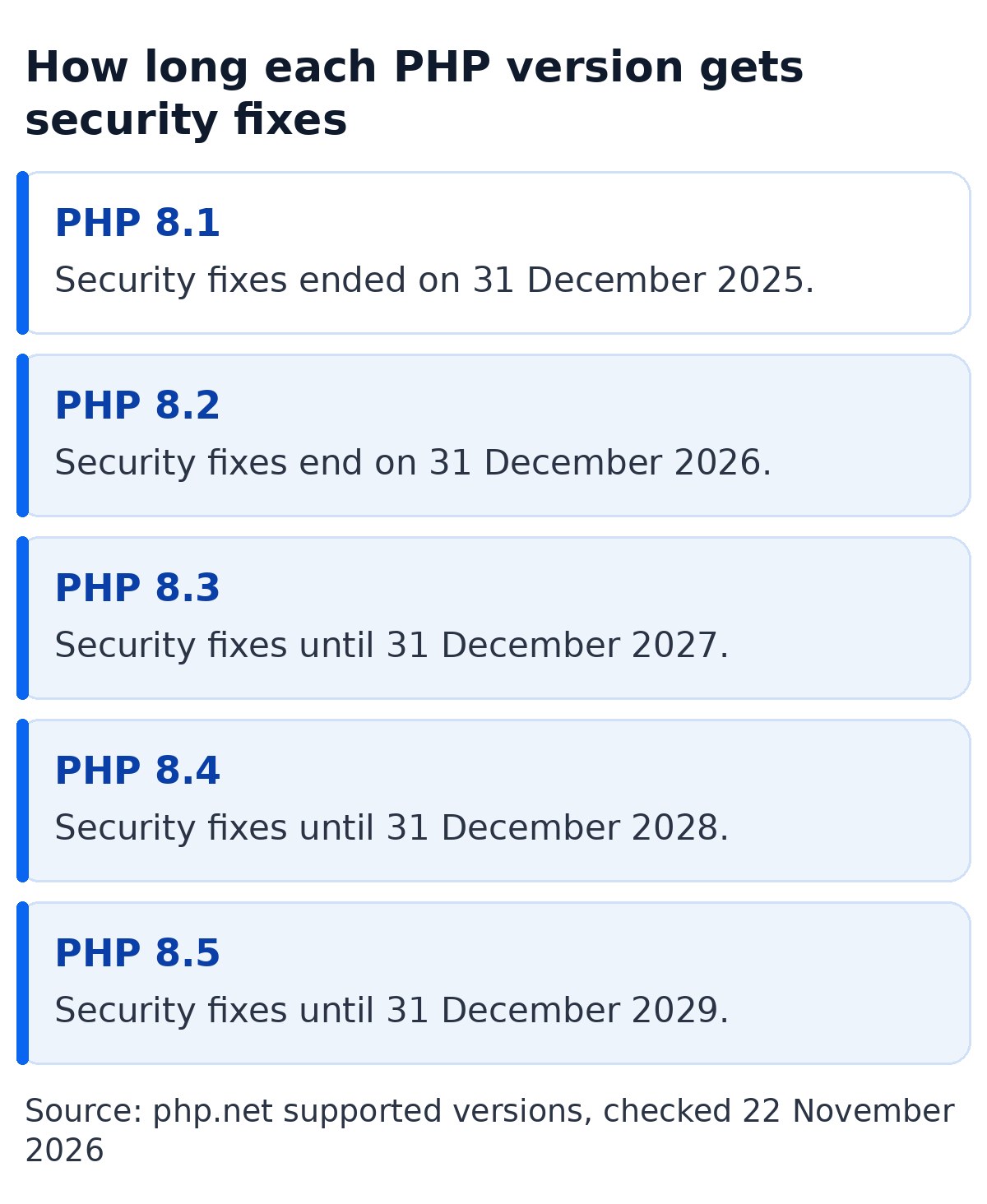
A WordPress PHP update moves your site onto a newer version of PHP, the programming language WordPress runs on. Hosts force these updates because each PHP version only gets security fixes for a fixed period, and once that ends, any new hole in PHP itself stays open for good.
According to php.net, each PHP version gets two years of full support and then two more years of security fixes only. After that it reaches end of life. WordPress recommends PHP 8.3 or newer in its official requirements, and says older versions that have reached end of life may expose your site to security vulnerabilities.
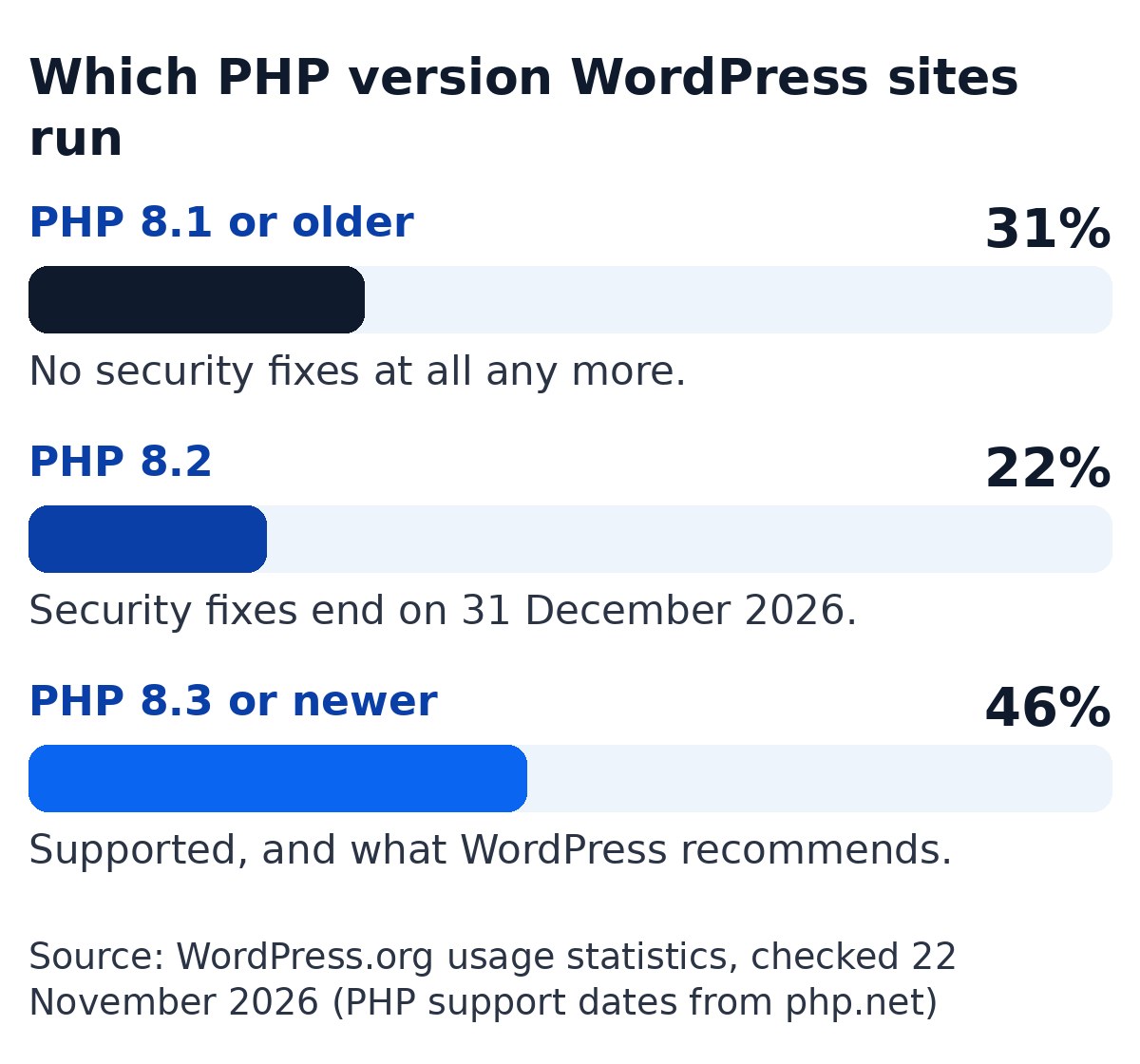
A lot of sites are behind. When I checked the WordPress.org usage statistics on 22 November 2026, about 31% of WordPress sites were running PHP 8.1 or older, which no longer gets any security fixes. Another 22% were on PHP 8.2, whose security fixes end on 31 December 2026. So from the new year, over half of WordPress sites will be on a PHP version with no security support.
The reason so many sites stay behind is that a PHP update can break things. An old theme or plugin written for an earlier version may throw a critical error the moment the host switches over. So when a host retires an old PHP version, the sites that haven’t been looked after are the ones that go down.
The fix is to test the new PHP version on a copy of the site first, update or replace anything that fails, then switch the live site over. It doesn’t always mean a rebuild. For one of the Green Yurts sites we look after, built on a 2017 theme, we updated its code to run on PHP 8.3 so it stays secure and online without the cost of a rebuild. This is the kind of job good WordPress maintenance should handle for you, on your timetable rather than the host’s.
How to Check Your Site for Backup, Security and Broken Link Problems
You can check most of this yourself in about ten minutes from the WordPress dashboard. If any of these checks turns something up, the site needs maintenance now rather than later.
- Dashboard, then Updates. The Updates screen lists every WordPress, plugin and theme update still waiting.
- Tools, then Site Health. The Site Health screen flags critical issues, and its Info tab shows which PHP version your server runs, so you can compare it with the dates above.
- Your own contact form. Send yourself an enquiry and check it arrives.
- Your last restore. Ask whoever looks after the site when a backup was last restored. If nobody knows, treat it as untested.
When Professional Website Maintenance Is Not Worth the Cost
Paying for maintenance isn’t worth it if your site is a small brochure that earns nothing directly and someone in-house will reliably do the work. In that case you’d mostly be paying for time you already have.
Be honest about the “reliably” part, though. Doing it yourself means logging in every week, running the updates, clicking through the key pages and forms afterwards, checking that backups are running and restoring one now and then. It also means knowing what to do when the layout goes wrong two days before a show. It’s easy to start with good intentions and then stop when things get busy, which is exactly when the site needs it most.
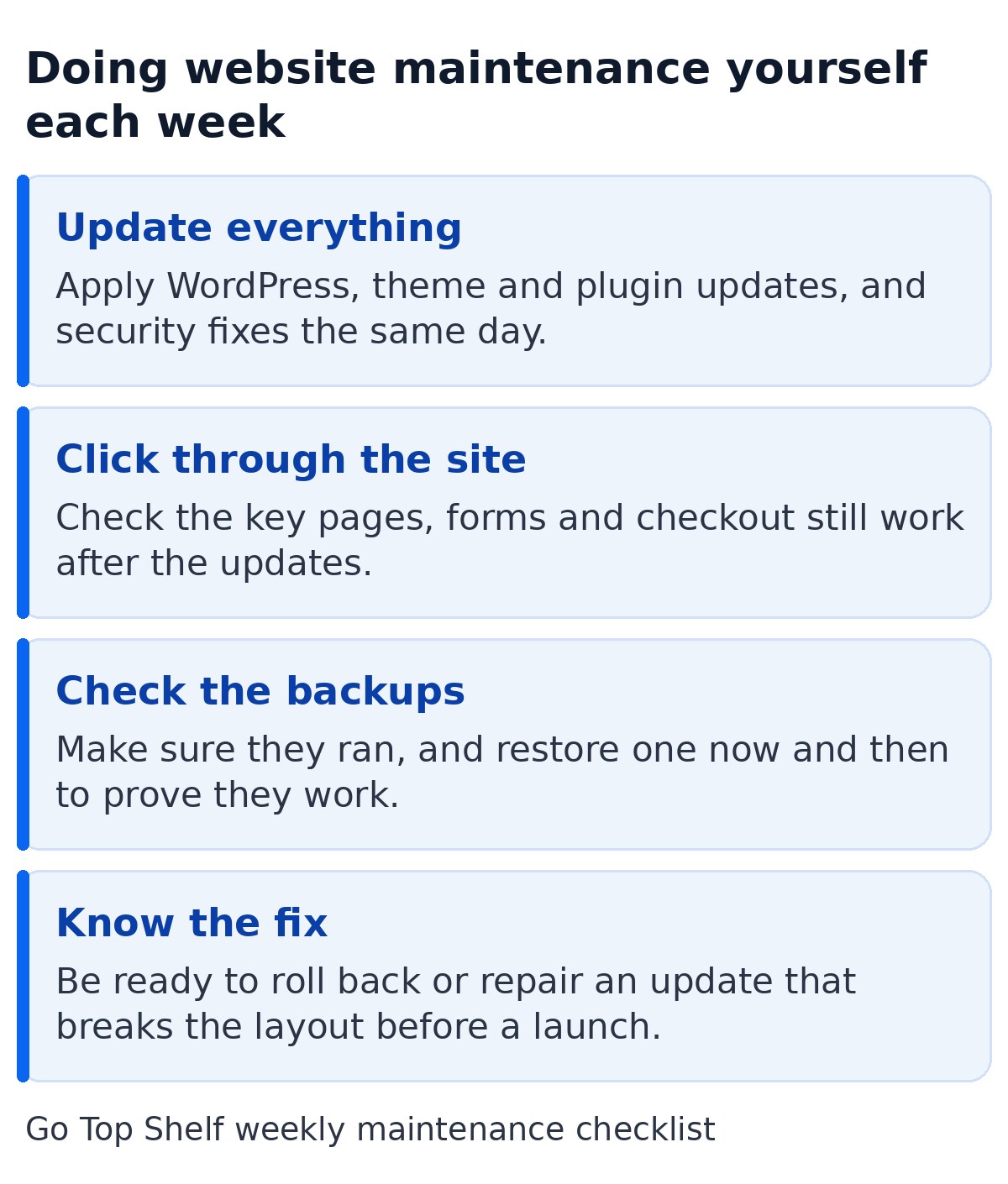
If you only need the odd change and can wait a few days for a fix, paying a developer by the job can work too, as long as someone still books in the maintenance every month.
Backup and Monitoring Services in Our WordPress Maintenance Plans
Our website maintenance plans cover everything in the monthly routine above, with hosting included for most sites, so for most sites the monthly price is the whole price. The difference between the three care plans is how much of our time you get for changes.
- Care, £150 a month plus VAT. For a finished site you edit yourself. Hosting, backups, weekly maintenance, hack repair, uptime checks and small fixes, with replies the same working day.
- Support, £350 a month plus VAT. For marketing departments who need a steady flow of changes. Everything in Care plus about 3 hours of changes a month, same-day replies 7 days a week, and unused hours roll over for up to 3 months.
- Team, £750 a month plus VAT. For busy marketing and events departments who need technical people on call. Changes, optimisation and integrations as you need them, within fair use, with a named contact who knows your site.
All three are monthly with no exit fee, and you keep full ownership of your website, domain and content. The Green Yurts sites are a good example of what that looks like in practice. On Glastonbury ticket day, Glampville saw over 13 times its usual visits from Google, on a site we keep ready for days like that. If you need hands-on help with a WordPress issue right now, our WordPress support page explains how we fix it.
Not sure what your site needs? Start with a free website audit. We check your site’s security, performance, speed and SEO, and send you a clear report within one working day.
Frequently asked questions
Do I need a website maintenance plan?
You need one if your website brings in enquiries, bookings or sales and nobody in-house can handle the maintenance every week, test backups and fix problems quickly. If your site is a simple brochure and someone in-house reliably does that work, you can manage without one, as long as it really happens every week.
Do WordPress websites need maintenance?
Yes, they need regular maintenance. WordPress, your theme and your plugins all release new versions often, many of them security fixes, and older PHP versions lose security support every year. Without someone applying and testing them, a WordPress site gets less secure and more likely to fail every month it’s left.
Should I turn on automatic plugin updates?
For minor WordPress core releases, yes, and WordPress does this by default. For plugins, automatic updates are better than none, but they can spoil a layout, form or checkout without anyone noticing. The safest routine is a weekly check of your key pages after updating, plus same-day action on urgent security fixes.
Is website hosting the same as website maintenance?
No. Hosting keeps the server running, and a good host will look after the server software and its security. Most hosts won’t touch your plugins, test your forms or fix a layout that slips. Maintenance covers the website itself. On our plans hosting is included for most sites, so you get both together.
How much is monthly maintenance for a website?
It depends mostly on how much hands-on time is included each month and whether hosting and hack repair are part of the price. Our plans are £150, £350 or £750 a month plus VAT. Our guide to website maintenance costs in the UK compares doing it yourself, paying by the job and paying monthly.